Key takeaways
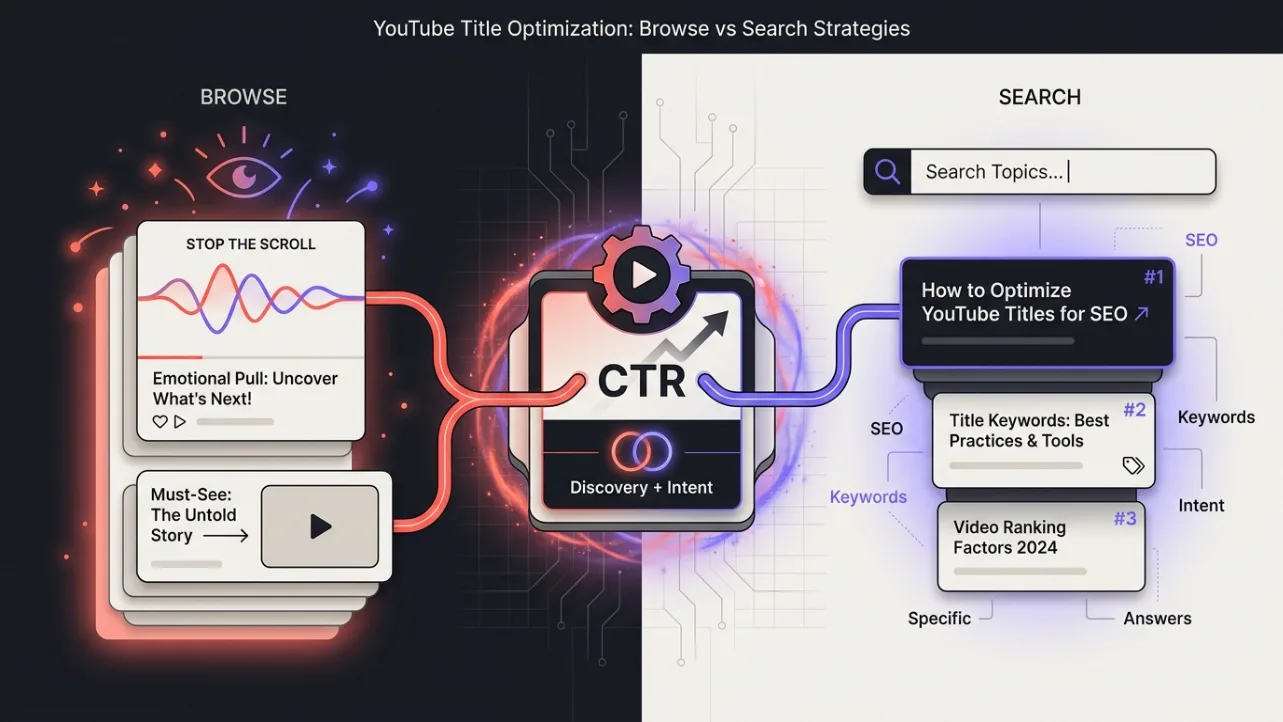
- YouTube titles serve two distinct purposes: sparking curiosity for browse viewers and delivering clarity for search viewers.
- Browse traffic comes from the homepage, suggested videos, and subscriptions — it rewards titles that tease, intrigue, or promise surprise.
- Search traffic comes from users typing queries — it rewards titles that directly answer questions or name exactly what the video delivers.
- You can identify which surface your video relies on by checking your YouTube Analytics traffic sources and comparing performance across surfaces.
- When a video needs to serve both surfaces, use a hybrid title structure: curiosity hook first, clarity second — separated by a colon or pipe.
YouTube Title Optimization: Why Your Title Must Serve Two Audiences
YouTube title optimization isn’t about writing one perfect title — it’s about writing the right title for the right surface. Browse viewers discover videos through recommendations, the homepage, or subscriptions, and they respond to curiosity and emotional hooks. Search viewers type specific queries and expect clear, direct answers. Your title must speak to both — or at least know which one it’s targeting.
Titles that work for browse often underperform in search, and vice versa. A title like “You Won’t Believe What Happened Next” might get clicks from the homepage but won’t rank for “how to fix a leaky faucet.” Understanding this split is the first step to writing titles that actually move the needle — whether you’re aiming for suggested traffic or search traffic.
How Browse and Search Surface a Video to Different Viewers
Browse and search surface your video to different viewers because they serve different user intentions. Browse viewers are in discovery mode — they’re scrolling, not searching. They’re open to surprise, entertainment, or serendipity. Search viewers are in task mode — they’re looking for a specific answer, tutorial, or product. They’re less tolerant of ambiguity and more likely to click only if the title matches their query exactly.
YouTube’s interface reflects this split. The homepage and “Up Next” suggestions are designed to keep viewers watching — so they favor titles that spark curiosity or emotion. The search bar, however, is designed to deliver precise results — so it favors titles that match keywords and intent. Your title must align with the surface it’s appearing on, or you’ll miss the audience you’re trying to reach.
Browse Rewards Curiosity — Search Rewards Clarity
Browse rewards curiosity because viewers aren’t actively seeking anything — they’re open to being surprised. Titles that use open loops, questions, or emotional triggers (“I Tried This for 30 Days — Here’s What Happened”) perform better here. Search rewards clarity because viewers are looking for a specific solution — they want to know exactly what they’ll get before clicking. Titles that include keywords, numbers, or direct answers (“How to Fix a Leaky Faucet in 5 Minutes”) win here.
This isn’t about being misleading — it’s about matching the viewer’s mindset. A browse viewer wants to be intrigued; a search viewer wants to be informed. A title that tries to do both without structure often fails at both. The key is to know which surface you’re targeting — or to structure your title to serve both without confusing either.
How to Tell Which Surface Your Video Depends On
You can tell which surface your video depends on by checking your YouTube Analytics traffic sources. Go to the “Traffic source” report and look at the “Browse features” and “Search” tabs. If most of your views come from “Browse features,” your video is being discovered through the homepage, suggested videos, or subscriptions — so your title should lean into curiosity. If most of your views come from “Search,” your video is being found through typed queries — so your title should prioritize clarity and keywords.
Also, look at your click-through rate (CTR) by traffic source. A high CTR from browse but low from search suggests your title is great for discovery but not for search. A high CTR from search but low from browse suggests the opposite. Use this data to refine your title strategy — don’t guess, measure.
One Video’s Title Written Two Ways — Side by Side
Here’s a concrete example: a video about “how to make a perfect omelette.” The browse-optimized title might be “I Made 100 Omelettes — This Is the One That Changed Everything.” The search-optimized title would be “How to Make a Perfect Omelette: Step-by-Step Recipe for Beginners.”
Both titles describe the same video — but they’re written for different surfaces. The browse version uses a personal story and a promise of transformation to hook viewers scrolling. The search version uses a clear, keyword-rich structure to attract viewers typing “how to make omelette.” Neither is “better” — they’re just optimized for different contexts.
| Surface | Title Example | Why It Works |
|---|---|---|
| Browse | I Made 100 Omelettes — This Is the One That Changed Everything | Uses personal story, open loop, and emotional hook to spark curiosity. |
| Search | How to Make a Perfect Omelette: Step-by-Step Recipe for Beginners | Includes keywords, structure, and clarity to match search intent. |
What to Do When a Video Genuinely Needs Both
Some videos need to serve both browse and search surfaces — especially evergreen tutorials or product reviews. In these cases, use a hybrid title structure: curiosity hook first, clarity second — separated by a colon or pipe. For example: “I Tried Every Omelette Recipe — Here’s the One That Actually Works | How to Make a Perfect Omelette.”
This structure works because it speaks to both audiences without confusing either. The first part grabs the browse viewer’s attention; the second part reassures the search viewer that the video delivers what they’re looking for. It’s not a perfect solution — you’re still making a trade-off — but it’s the best compromise when you need to serve two masters.
Also, consider testing two versions of the title using YouTube’s A/B testing feature (if available) or by republishing with a new title after a few weeks. Track which version performs better on each surface — and let the data guide your next move. You can also use our free thumbnail and title analysis tool to get instant feedback on how your title might perform across surfaces.
YouTube Suggested Traffic: How to Optimize for the Homepage and Recommendations
YouTube suggested traffic — from the homepage, “Up Next,” or subscriptions — is driven by viewer behavior, not search queries. To optimize for this surface, focus on titles that spark curiosity, emotion, or urgency. Use open loops (“You Won’t Believe What Happened”), questions (“Is This the Best Way to…?”), or personal stories (“I Tried This for 30 Days — Here’s What Happened”).
Also, pair your title with a thumbnail that reinforces the hook — a surprised face, a bold text overlay, or a before/after contrast. The goal is to make the viewer pause mid-scroll and think, “I need to see this.” Don’t worry about keywords here — focus on emotional resonance and visual contrast. Suggested traffic is about discovery, not precision.
YouTube Title SEO: How to Optimize for Search Queries
YouTube title SEO is about matching what viewers are typing into the search bar. Use exact-match keywords, include numbers or steps, and structure your title to answer a specific question. For example: “How to Make a Perfect Omelette in 5 Minutes | Easy Step-by-Step Recipe.”
Also, place your primary keyword near the front of the title — YouTube’s search algorithm gives more weight to the first few words. Avoid clickbait or vague phrasing — search viewers are less forgiving of misleading titles. If your title doesn’t clearly state what the video delivers, they’ll click away — and that hurts your ranking. Use tools like Google Trends or YouTube’s autocomplete to find high-intent keywords for your niche.
Related reading
Frequently Asked Questions
Can I optimize my YouTube title for both browse and search at the same time?
Yes, but it requires a hybrid structure: curiosity hook first, clarity second — separated by a colon or pipe. For example: “I Tried Every Omelette Recipe — Here’s the One That Actually Works | How to Make a Perfect Omelette.” This speaks to both audiences without confusing either, though it’s still a compromise.
How do I know if my video is getting more browse or search traffic?
Check your YouTube Analytics traffic sources. Go to the “Traffic source” report and compare “Browse features” vs. “Search.” Also, look at your CTR by traffic source — a high CTR from browse but low from search suggests your title is great for discovery but not for search.
Should I change my title after publishing to optimize for a different surface?
Yes, if the data shows your video is underperforming on a key surface. Republishing with a new title can reset your CTR and give you a fresh chance to reach the right audience. Just be aware that changing the title after a few weeks may affect your existing SEO — so test carefully.
Does YouTube’s algorithm favor browse or search titles?
YouTube doesn’t favor one over the other — it surfaces videos based on viewer behavior and intent. Browse titles work better for discovery; search titles work better for precision. The algorithm doesn’t “prefer” one — it matches the right title to the right surface based on what viewers are doing.
Can I use the same title for all my videos if they’re in the same niche?
No — each video should have a unique title tailored to its content and target surface. Even if your videos are in the same niche, they may serve different purposes (tutorial, review, story) and need different title strategies. Generic titles dilute your message and hurt your CTR.