Key takeaways
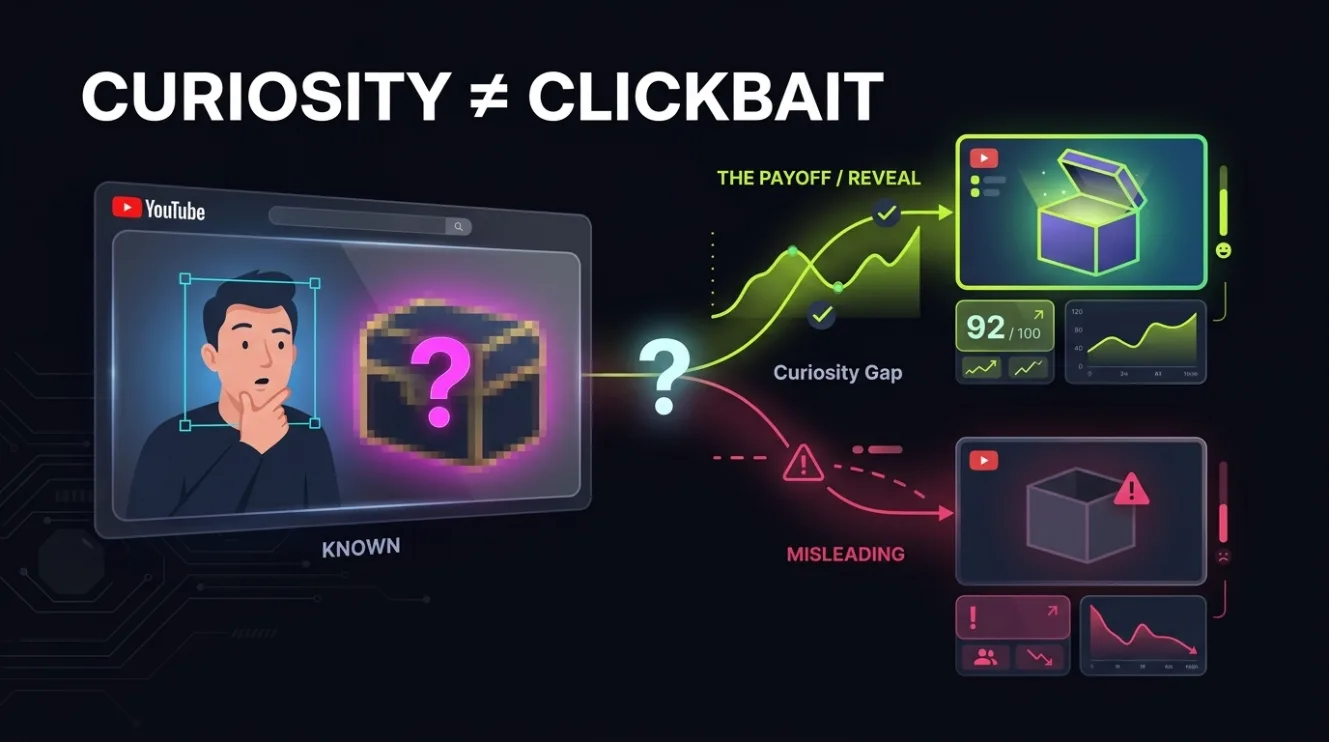
- The curiosity gap works by revealing just enough to spark interest while withholding a key detail that only the video can resolve.
- Useful hidden information invites genuine engagement; misleading information erodes trust and hurts long-term performance.
- A balanced opening combines a clear visual hook with a specific, honest question or statement that aligns with the video’s content.
- Weak thumbnails lack hooks, exaggerated ones mislead, and balanced ones deliver on their promise while sparking curiosity.
What is the curiosity gap on YouTube — and why it works
The curiosity gap on YouTube is the psychological space between what a viewer knows and what they want to know — created by revealing just enough to spark interest while withholding a key detail that only the video can resolve. This technique leverages natural human curiosity to drive clicks without deception. When done right, it doesn’t trick viewers — it invites them to solve a puzzle they’re already invested in.
Curiosity gaps work because the human brain is wired to seek closure. When you present a partial story, an unanswered question, or a visual contradiction, the viewer’s mind automatically tries to fill the gap. That mental effort creates engagement — and that engagement translates to clicks. But the gap must be honest. If the video doesn’t deliver on the promise, viewers leave, and YouTube’s system notices.
YouTube’s recommendation system rewards videos that keep viewers watching. A curiosity gap that delivers on its promise increases watch time and retention — two of the strongest signals YouTube uses to promote content. Misleading gaps, on the other hand, lead to high drop-off rates, which signals to YouTube that the video isn’t satisfying viewers — and the algorithm responds by reducing its reach.
How to distinguish useful hidden information from misleading information
Useful hidden information teases a specific, valuable insight that the video actually delivers — for example, “This one trick saved my channel from dying” implies a concrete solution that the video must provide. Misleading information, in contrast, promises something the video doesn’t deliver — like “You won’t believe what happened next” when nothing surprising occurs. The difference lies in alignment: useful gaps match the video’s content; misleading ones create false expectations.
Useful gaps respect the viewer’s time. They signal that the video contains something worth watching — a solution, a revelation, a comparison — without overpromising. Misleading gaps exploit attention by creating artificial urgency or mystery. They often rely on exaggerated visuals, sensational text, or vague phrases like “shocking truth” or “you won’t believe this” — none of which tell the viewer what they’ll actually learn.
To test whether your gap is useful, ask: “If I clicked this thumbnail and read this title, would I feel satisfied after watching the video?” If the answer is no, you’ve crossed into misleading territory. Viewers remember broken promises — and they vote with their attention. Channels that consistently mislead see declining CTR over time, not because viewers are fooled, but because they learn to avoid the channel.
How to create a balanced opening for your YouTube thumbnail and title
A balanced opening combines a clear visual hook with a specific, honest question or statement that aligns with the video’s content — for example, “Why this channel grew 300% in 3 months (and how you can too)” reveals the outcome while withholding the method, which the video then explains. This approach sparks curiosity without deception because it promises something real and delivers it.
To build a balanced opening, start with the core value of your video. What specific problem does it solve? What unique insight does it offer? Then, frame that value as a question or partial statement that invites the viewer to learn more. Avoid vague phrases like “you need to see this” — instead, use specifics like “the mistake 90% of creators make” or “how I got 10K views in 24 hours.” Specificity builds credibility and reduces the risk of misleading.
Next, pair that title with a thumbnail that visually reinforces the gap. Use a clear, high-contrast image that shows the subject of the video — for example, a person holding a phone with a graph on screen for a growth tutorial, or a before/after split for a transformation video. Add minimal text — one short phrase that mirrors the title’s hook. Avoid clutter, exaggerated expressions, or misleading props. The thumbnail should look like a natural snapshot of the video’s content, not a staged advertisement.
Weak, balanced, and exaggerated curiosity gap examples — and why they work (or don’t)
Weak curiosity gaps fail to spark interest because they lack specificity or a clear hook — for example, “How to grow your channel” is too broad to create tension. Balanced gaps, like “Why my channel grew 300% in 3 months (and how you can too),” reveal enough to signal value while withholding the method. Exaggerated gaps, such as “You won’t believe what happened next — I made $10K in 1 day!”, promise sensational outcomes the video rarely delivers, leading to viewer distrust.
Here’s a comparison of how each type performs:
| Type | Example Title | Thumbnail Approach | Viewer Outcome |
|---|---|---|---|
| Weak | “How to make YouTube videos” | Generic camera or laptop image | Low CTR — no hook, no urgency |
| Balanced | “Why my channel grew 300% in 3 months (and how you can too)” | Person holding phone showing growth graph | High CTR + retention — delivers on promise |
| Exaggerated | “You won’t believe what happened next — I made $10K in 1 day!” | Over-the-top facial expression, dollar bills flying | High initial CTR, low retention — breaks trust |
The balanced example works because it creates a gap — the “how” — that the video fills. The weak example doesn’t create tension because it’s too vague. The exaggerated example creates false tension by promising an outcome that’s unlikely to be delivered, which leads to viewer disappointment and algorithmic penalties.
How to test your curiosity gap before publishing
Before publishing, test your title and thumbnail with a small group of viewers who haven’t seen the video. Ask them: “What do you expect to learn from this video?” If their answers match the video’s content, you’ve created a useful gap. If they expect something different — especially something sensational — you’ve crossed into misleading territory.
You can also use ThumbSignal’s free thumbnail & title analysis tool to get an objective score on how well your gap aligns with viewer expectations. The tool evaluates clarity, specificity, and emotional resonance — three key factors that determine whether a gap is useful or misleading. A high score doesn’t guarantee clicks, but it does signal that your gap is honest and likely to retain viewers.
How to apply the curiosity gap to different video types
The curiosity gap isn’t one-size-fits-all — it must be tailored to your video’s format and audience. For tutorials, frame the gap around the outcome: “How I fixed my audio in 5 minutes (no fancy gear needed).” For reviews, focus on the surprise: “This $20 tool outperformed my $200 mic — here’s why.” For vlogs, highlight the unexpected: “I tried living like a YouTuber for a week — here’s what broke me.”
The key is to match the gap to the video’s structure. Tutorials should promise a solution; reviews should promise a revelation; vlogs should promise an experience. Avoid forcing a gap where it doesn’t fit — for example, a news update doesn’t need mystery, and a product unboxing should show the product clearly. The gap must serve the content, not override it.
One common mistake is applying the same gap formula to every video. A channel that uses “You won’t believe this” for every title trains viewers to ignore it. Instead, vary your hooks: sometimes use a question, sometimes a statement, sometimes a comparison. The goal is to keep the gap fresh while staying honest — so viewers stay curious, not cynical.
Why ethical curiosity gaps build long-term channel growth
Channels that use ethical curiosity gaps build trust with viewers — and trust translates to loyalty, retention, and algorithmic favor. When viewers know your thumbnails and titles deliver on their promises, they’re more likely to click again, watch longer, and subscribe. That consistent engagement signals to YouTube that your content is valuable — which leads to more recommendations.
Misleading gaps, on the other hand, create short-term gains at the cost of long-term damage. A video with a sensational title might get a spike in views, but if viewers leave within seconds, YouTube reduces its reach. Over time, channels that rely on deception see declining CTR and watch time — not because their content is bad, but because viewers learn to avoid them.
Building a sustainable channel means prioritizing viewer satisfaction over clickbait. A curiosity gap that’s honest and specific doesn’t just get clicks — it gets loyal viewers. And loyal viewers are the foundation of any successful YouTube channel.
Related reading
- Clickbait vs Curiosity: Why Retention Matters on YouTube
- YouTube Title Optimization: Browse vs Search Strategies That Work
Frequently Asked Questions
What is the curiosity gap in YouTube thumbnails?
The curiosity gap in YouTube thumbnails is the technique of revealing just enough visual information to spark interest while withholding a key detail that only the video can resolve — for example, showing a person holding a phone with a graph on screen but not revealing the numbers, which the video then explains.
Can the curiosity gap be used without misleading viewers?
Yes — by ensuring the gap aligns with the video’s actual content. A useful gap teases a specific, valuable insight that the video delivers, such as “Why my channel grew 300% in 3 months (and how you can too),” rather than vague or sensational promises that don’t match the video.
How do I know if my curiosity gap is too weak?
If your title or thumbnail doesn’t create tension or invite the viewer to learn more — for example, “How to make YouTube videos” — it’s too weak. Strong gaps use specificity, contrast, or a clear question to signal value, like “The mistake 90% of creators make (and how to fix it).”
Is it okay to use exaggerated thumbnails if they get more clicks?
No — exaggerated thumbnails that mislead viewers hurt long-term performance. While they may get initial clicks, they lead to high drop-off rates, which signals to YouTube that the video isn’t satisfying viewers — reducing its reach and damaging your channel’s reputation.
How can I test if my curiosity gap works?
Test your title and thumbnail with a small group of viewers who haven’t seen the video. Ask them what they expect to learn. If their answers match the video’s content, your gap is useful. You can also use tools like ThumbSignal’s free analysis tool to evaluate clarity and alignment.