Key takeaways
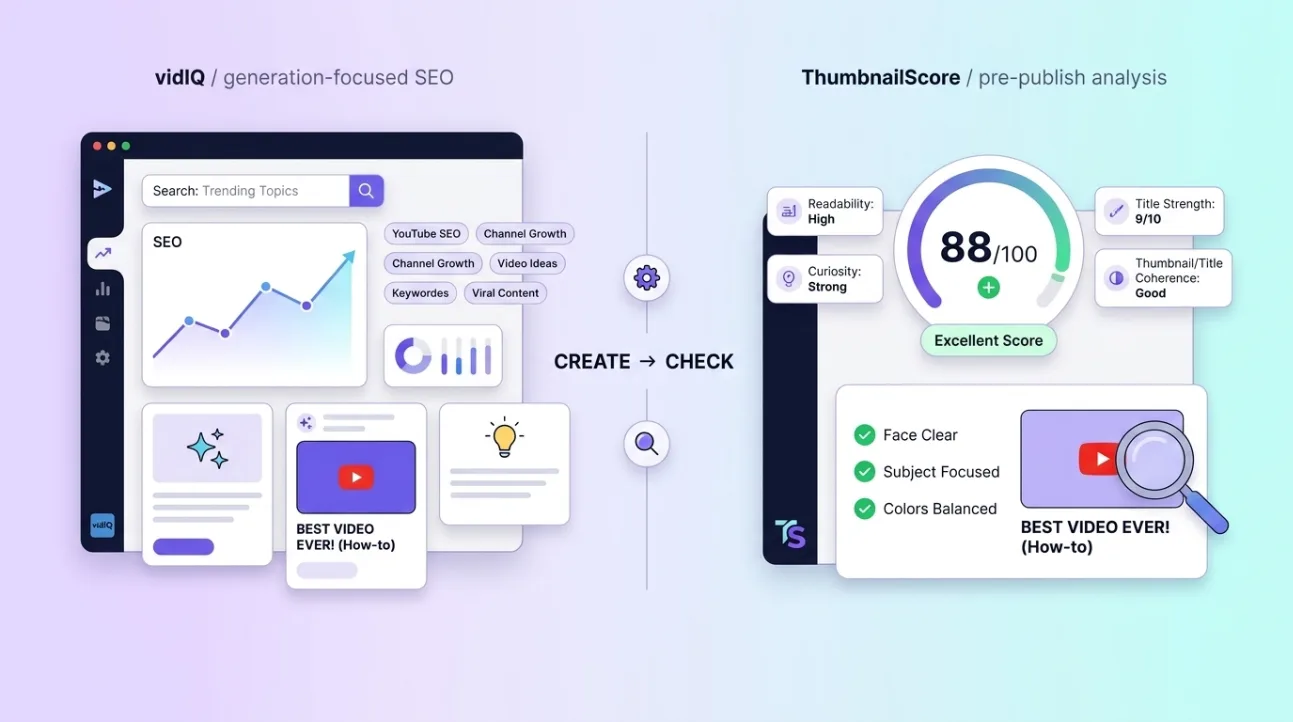
- vidIQ is a comprehensive YouTube growth toolkit that includes AI-powered thumbnail generation and SEO optimization.
- ThumbSignal is a focused diagnostic tool that analyzes your existing thumbnail and title before publishing to improve click-through rate.
- Choose vidIQ if you need help creating thumbnails and optimizing video metadata; choose ThumbSignal if you want to refine what you’ve already made.
- Both tools serve different stages of the YouTube workflow — one is generative, the other is evaluative.
- Pricing models differ: vidIQ offers tiered subscriptions for broader features, while ThumbSignal is free to use, with a daily limit on analyses.
What is vidIQ, and who is it for?
vidIQ is a full-featured YouTube growth and SEO toolkit designed for creators who want to streamline video optimization from keyword research to thumbnail generation. It’s aimed at channel managers, teams, and solo creators who need integrated tools to boost discoverability and performance across multiple videos. Its AI thumbnail generator helps users create eye-catching visuals quickly, while its SEO features suggest tags, titles, and descriptions based on trending data.
Many users rely on vidIQ to reduce the time spent on pre-publish tasks by automating suggestions and offering performance benchmarks. It’s especially useful for creators who publish frequently and need consistent, data-backed optimizations. The platform also includes competitor tracking, historical analytics, and content planning features — making it a one-stop shop for channel growth.
While vidIQ’s thumbnail generator is powerful, it doesn’t offer deep diagnostic feedback on why a specific thumbnail might underperform. Instead, it focuses on helping you build new assets with built-in best practices. If you’re starting from scratch or need help ideating visuals, vidIQ’s generative tools can be a significant time-saver.
What is ThumbSignal, and who is it for?
ThumbSignal is a focused diagnostic tool that evaluates your existing thumbnail and title before you hit publish. It gives you a 0-100 score, the twelve sub-scores behind it, recommendations ordered by how much each could raise the score, and up to five alternative titles. It’s built for creators who already have a thumbnail design and want to check it against twelve packaging factors, from thumbnail readability and title strength to promise clarity and clickbait risk. Rather than generating new thumbnails, it analyzes what you’ve made and shows which factors are holding it back.
This tool is ideal for creators who value precision and want to avoid publishing underperforming thumbnails. It’s especially helpful for those who invest time in custom designs and want to ensure they’re optimized for maximum engagement. ThumbSignal doesn’t replace your design process — it enhances it by providing a consistent second reading you can act on immediately.
Because it’s narrowly focused, ThumbSignal doesn’t include keyword research, competitor analysis, or video scheduling. Its strength lies in reading the thumbnail and title together — how readable the image is at feed size, how clearly the pair states its promise, how well the two fit, and how much curiosity, emotion and clickbait risk they carry. If you’re refining a thumbnail you’ve already created, this is the tool to help you see what to change.
How do vidIQ and ThumbSignal differ in function?
vidIQ and ThumbSignal serve fundamentally different purposes: vidIQ helps you generate and optimize thumbnails and metadata from the ground up, while ThumbSignal analyzes your existing thumbnail and title to suggest improvements. One is a generative toolkit; the other is a diagnostic analyzer. Neither is inherently “better” — they’re designed for different stages of the content creation process.
Think of vidIQ as your production assistant — it helps you build thumbnails, suggests titles, and provides SEO guidance. ThumbSignal, on the other hand, acts like a quality assurance reviewer — it examines your final draft and flags issues before you publish. Creators who need help ideating or building assets will lean toward vidIQ; those who want to validate or refine their work will find more value in ThumbSignal.
Both tools can coexist in a creator’s workflow. For example, you might use vidIQ to generate a thumbnail draft, then run it through ThumbSignal to fine-tune the design before publishing. The key is understanding which tool addresses your immediate need — creation or refinement.
vidIQ vs ThumbSignal: A direct comparison
When comparing vidIQ and ThumbSignal, the most important distinction is scope. vidIQ is a broad platform offering multiple tools for YouTube growth, while ThumbSignal is a single-purpose analyzer focused exclusively on thumbnail and title performance. This difference in scope directly impacts who each tool is best suited for and how they fit into your workflow.
Here’s a high-level comparison of the two tools:
| Feature | vidIQ | ThumbSignal |
|---|---|---|
| Primary Function | AI thumbnail generation + SEO toolkit | Thumbnail and title analysis |
| Scope | Broad: keyword research, competitor tracking, video scheduling, analytics | Narrow: focused on pre-publish thumbnail and title diagnostics |
| Pricing Model | Tiered subscription with feature bundles | Free, with a daily limit on analyses |
This table highlights that vidIQ is designed for creators who want an all-in-one solution, while ThumbSignal is built for those who prioritize precision in their final assets. Neither tool replaces the other — they complement each other by addressing different needs.
Which tool should you choose based on your workflow?
Your choice between vidIQ and ThumbSignal depends on where you are in your content creation process. If you’re struggling to come up with thumbnail ideas or need help optimizing metadata, vidIQ’s generative features will save you time and provide structure. If you already have a thumbnail and want to ensure it’s as effective as possible, ThumbSignal’s diagnostic feedback will help you refine it for maximum impact.
Consider your workflow: Are you starting from scratch or polishing a finished asset? Do you need help with keyword research and competitor analysis, or are you focused solely on thumbnail performance? Answering these questions will help you determine which tool aligns with your current priorities.
For example, a creator launching a new channel might benefit from vidIQ’s comprehensive features to establish a consistent publishing rhythm. A seasoned creator with a strong design process might prefer ThumbSignal to fine-tune their thumbnails and squeeze out every possible click. Both tools have value — it’s about matching the tool to the task.
How to use both tools together for maximum impact
Many creators find success by combining vidIQ and ThumbSignal in their workflow. Start with vidIQ to generate a thumbnail draft and optimize your title using its SEO suggestions. Then, run that thumbnail through ThumbSignal to see how it scores on readability, promise clarity, coherence with the title and emotion. Use that feedback to make targeted adjustments before publishing.
Here’s a simple 5-step process to integrate both tools:
- Use vidIQ to generate a thumbnail draft and suggest a title based on keyword trends.
- Export the thumbnail and title to your design tool for final adjustments.
- Run the completed thumbnail and title through ThumbSignal for diagnostic feedback.
- Refine the thumbnail based on the score and improvement suggestions.
- Publish with confidence, knowing your thumbnail has been optimized for maximum click-through rate.
This hybrid approach leverages the strengths of both tools: vidIQ’s generative power and ThumbSignal’s diagnostic precision. It’s especially useful for creators who want to maintain creative control while still benefiting from data-driven optimization.
For a deeper dive into how ThumbSignal’s scoring system works, check out our guide to the 12 factors that influence your thumbnail score. To see the method at work, read our two worked before-and-after examples.
Why thumbnail analysis matters more than you think
Thumbnail performance directly impacts your video’s click-through rate — and that’s one of the most important signals YouTube uses to determine which videos to recommend. A thumbnail that doesn’t stand out in a crowded feed can cost you thousands of potential views, even if the content is excellent. That’s why tools like ThumbSignal exist: to help you catch issues before they cost you audience.
Common problems ThumbSignal flags include text that is hard to read at feed size, a title that repeats the thumbnail instead of adding to it, a vague promise and a hook that leans on clickbait. The score is a model’s reading, not a measurement of your audience: in our test on 321 pairs of real videos from the same channels, it ranked the better-performing video higher 59.5% of the time, a real but modest signal. Addressing those problems before publishing is a reasonable bet, not a guarantee.
It’s worth noting that even the most experienced creators can benefit from a second opinion. What looks great to you might not resonate with your audience — and that’s where a diagnostic tool like ThumbSignal adds real value. It’s not about changing your style; it’s about ensuring your style communicates effectively.
Related reading
- Best Free YouTube Thumbnail Testers: What’s Actually Free
- ThumbnailTest Alternative: Get Feedback Before Publishing
Frequently Asked Questions
Is ThumbSignal better than vidIQ for thumbnail creation?
No — ThumbSignal doesn’t create thumbnails; it analyzes them. If you need help generating thumbnails, vidIQ’s AI tools are more suitable. If you want to refine an existing thumbnail, ThumbSignal provides deeper diagnostic feedback.
Can I use both vidIQ and ThumbSignal together?
Yes, many creators use both tools in tandem. Use vidIQ to generate a thumbnail draft and optimize metadata, then run it through ThumbSignal to refine the design before publishing. This combines generative and diagnostic strengths.
Does vidIQ offer thumbnail analysis like ThumbSignal?
vidIQ provides general thumbnail suggestions and performance benchmarks, but it doesn’t offer the same level of diagnostic feedback as ThumbSignal. If you want detailed, actionable insights on your specific thumbnail, ThumbSignal is the better choice.
Which tool is more affordable for beginners?
ThumbSignal is free to use and has no paid plan: signed out you can run a few analyses a day, and a free account raises the limit. vidIQ typically requires a subscription for full access, which may be better suited for creators who need its broader feature set.
Do I need both tools if I’m serious about YouTube growth?
Not necessarily — it depends on your workflow. If you’re focused on generating content quickly, vidIQ’s all-in-one approach may be sufficient. If you prioritize thumbnail refinement, ThumbSignal’s diagnostic feedback can be invaluable. Many creators find value in using both.