Key takeaways
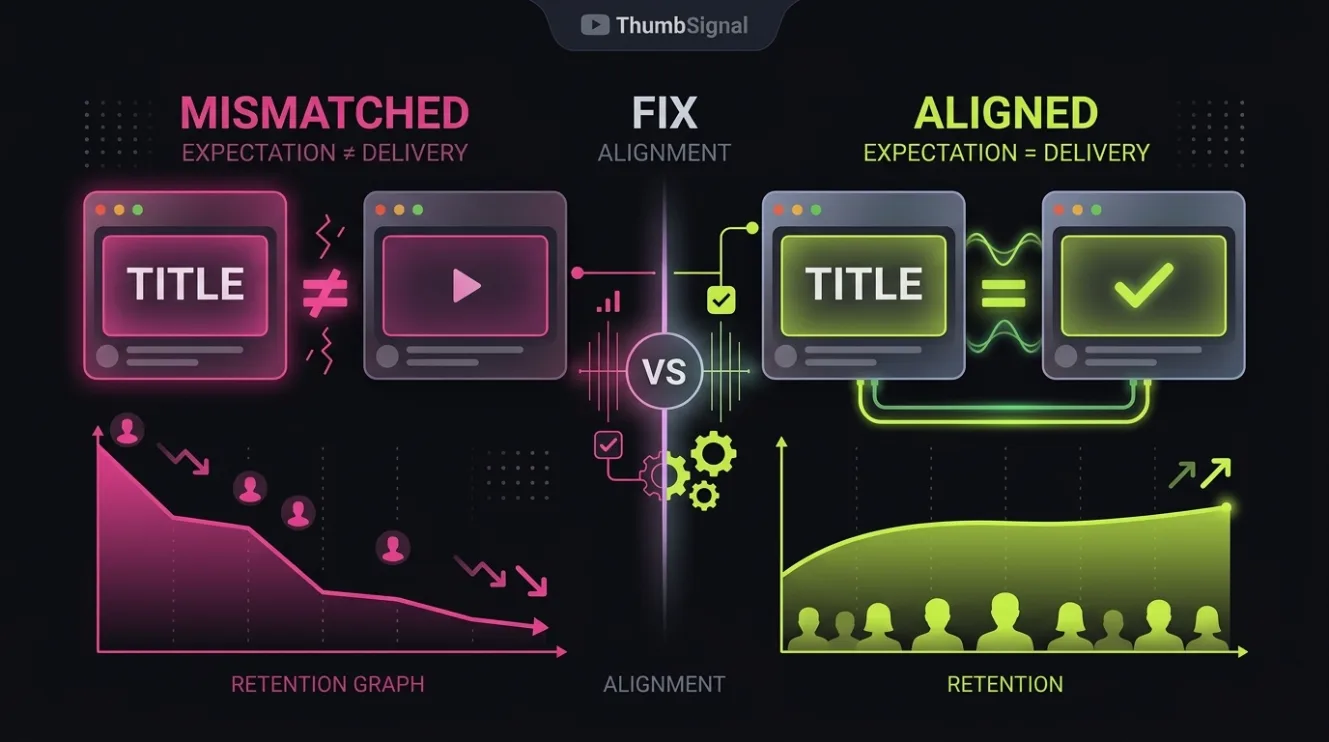
- Expectation mismatch happens when a video’s opening fails to deliver what the thumbnail and title promised, causing viewers to leave within seconds.
- The first 30 seconds are critical because viewers decide immediately whether the content matches their intent — a mismatch here kills retention.
- Opening your video with a clear, fast confirmation of the thumbnail’s promise reduces drop-off and builds trust with your audience.
- Not all retention issues are pacing problems — if the content doesn’t match the packaging, changing the video won’t fix it.
- Sometimes the fix isn’t editing the video, but adjusting the thumbnail or title to accurately reflect what the viewer will actually see.
What Is Expectation Mismatch on YouTube?
Expectation mismatch occurs when a viewer clicks on a video expecting one thing — based on the thumbnail and title — but the video’s opening delivers something different. This disconnect triggers immediate disappointment, and viewers leave. For example, a thumbnail shows a person holding a “$10,000 Gadget” with a shocked expression, but the video opens with a 30-second monologue about “why you shouldn’t buy expensive gadgets.” The viewer feels misled, not intrigued.
This isn’t about poor production or slow pacing — it’s about broken promises. The viewer didn’t click to hear a lecture; they clicked to see the gadget. When the video doesn’t confirm that expectation within the first few seconds, retention plummets. YouTube’s analytics will flag this as a drop-off point, but the root cause isn’t the video’s speed — it’s the mismatch between packaging and content.
Creators often misdiagnose this as a pacing issue and try to “speed up” the video, adding jump cuts or faster music. That rarely helps. The problem isn’t how fast the video moves — it’s whether it delivers what was promised. Fixing the mismatch requires aligning the video’s opening with the thumbnail and title, not just making it faster.
Why the First 30 Seconds Are Where Mismatch Is Felt
The first 30 seconds are where viewers decide whether to stay or leave — not because they’re impatient, but because they’re evaluating whether the video matches their intent. If the thumbnail promised a tutorial, but the video opens with a 10-second intro sequence, the viewer feels their time is being wasted. If the title said “How to Fix X in 5 Minutes,” but the video starts with a 20-second story about the creator’s childhood, the viewer feels misled.
This isn’t about attention spans — it’s about intent. Viewers click with a specific goal: to learn, to be entertained, to solve a problem. If the video doesn’t confirm that goal within the first few seconds, the viewer disengages. YouTube’s algorithm notices this drop-off and may reduce future recommendations. The key isn’t to make the video faster — it’s to make the opening more relevant to the promise.
Think of it like a restaurant menu. If the menu shows a steak, but the waiter brings a salad, the customer leaves — not because the salad is bad, but because it’s not what they ordered. The same applies to YouTube. The thumbnail and title are the menu; the video is the meal. If they don’t match, the viewer leaves.
How to Open a Video to Confirm the Packaging Quickly
To reduce expectation mismatch, open your video with a clear, fast confirmation of what the thumbnail and title promised. If the thumbnail shows a “Before and After” transformation, open with the “before” shot. If the title says “How to Fix X in 5 Minutes,” open with the problem statement and a quick preview of the solution. This doesn’t mean you can’t add personality or context — it means you must deliver the core promise first.
Here’s a simple 5-step process to align your opening with your packaging:
- Review your thumbnail and title — what specific promise do they make?
- Identify the core expectation — what does the viewer think they’ll see or learn?
- Open the video with a visual or verbal confirmation of that expectation within the first 3 seconds.
- Follow up with a brief explanation of why this matters — not to delay, but to validate the viewer’s choice.
- Then, transition into the full content — now that the viewer knows they’re in the right place.
This approach doesn’t require cutting out personality or context — it just requires prioritizing the promise. For example, if your thumbnail shows a “$10,000 Gadget,” open with a shot of the gadget, say “This is the $10,000 gadget you saw in the thumbnail,” then explain why you’re showing it. The viewer feels acknowledged, not misled.
Separating Expectation Mismatch from Pacing Problems
Many creators confuse expectation mismatch with pacing problems — they think if they speed up the video, retention will improve. But that’s not always true. A pacing problem is when the video is too slow, too repetitive, or lacks momentum — even if the content matches the promise. An expectation mismatch is when the content doesn’t match the promise, regardless of pacing.
Here’s how to tell the difference:
| Expectation Mismatch | Pacing Problem |
|---|---|
| Viewer leaves because the video doesn’t deliver what was promised. | Viewer stays initially but drops off because the video is too slow or repetitive. |
| Drop-off happens in the first 5-10 seconds. | Drop-off happens after 30 seconds or more. |
| Fix: Adjust the opening to match the thumbnail and title. | Fix: Tighten the script, add cuts, or increase energy. |
If your retention graph shows a sharp drop in the first 10 seconds, it’s likely an expectation mismatch. If the drop happens after 30 seconds, it’s more likely a pacing issue. Diagnosing correctly ensures you fix the right problem — editing a video to be faster won’t help if the content doesn’t match the packaging.
When to Fix the Packaging, Not the Video
Sometimes, the best fix for expectation mismatch isn’t editing the video — it’s changing the thumbnail or title. If your video’s content is solid but the packaging is misleading, no amount of editing will fix the drop-off. For example, if your video is a deep dive into “Why Most Gadgets Fail,” but your thumbnail shows a flashy “$10,000 Gadget,” viewers will leave because they expected a product review, not a critique.
In this case, the solution is to update the thumbnail and title to reflect the actual content. Change the thumbnail to show a broken gadget or a warning sign, and update the title to “Why Most Gadgets Fail (And How to Avoid It).” This doesn’t mean you’re watering down your content — it means you’re being honest about what the viewer will get. Viewers who click on an accurate thumbnail are more likely to stay, even if the content is slower or more analytical.
This approach also builds trust. Viewers who feel misled are less likely to return. Viewers who feel their expectations were met — even if the video is longer or more complex — are more likely to subscribe. The goal isn’t to trick viewers into clicking — it’s to attract the right viewers for your content.
How to Test and Refine Your Opening for Better Alignment
Once you’ve adjusted your opening to match your packaging, test it with real viewers. Ask a few people to watch the first 30 seconds and tell you what they expected based on the thumbnail and title. If they say “I expected to see X, but I saw Y,” you still have a mismatch. Refine until the opening confirms the promise without delay.
You can also use ThumbSignal’s free thumbnail & title analysis tool to get feedback on whether your packaging accurately reflects your content. The tool doesn’t just score your thumbnail — it checks for alignment with the video’s opening, helping you spot mismatches before you publish.
Remember, this isn’t about making your video “clickbaity” — it’s about being honest and clear. Viewers appreciate transparency. If your video is a tutorial, say so in the title and show the tutorial in the first 3 seconds. If it’s a review, show the product. If it’s a story, start with the hook. The faster you confirm the promise, the longer viewers will stay.
Related reading
- How to Use the Cliffhanger Effect to Boost YouTube Retention
- Clickbait vs Curiosity: Why Retention Matters on YouTube
Frequently Asked Questions
What’s the difference between expectation mismatch and clickbait?
Clickbait deliberately misleads viewers to get clicks, often with exaggerated thumbnails or titles. Expectation mismatch happens when the creator didn’t intend to mislead — they just failed to align the video’s opening with the packaging. The fix for both is the same: make the opening confirm the promise.
Can I fix expectation mismatch by adding a disclaimer in the first 5 seconds?
No. A disclaimer like “This isn’t what you think” doesn’t fix the mismatch — it confirms it. Viewers don’t want to be told they were wrong to click; they want to feel their click was justified. The fix is to deliver what was promised, not to apologize for not delivering it.
Should I change my thumbnail if my video has low retention?
Only if the thumbnail doesn’t match the video’s content. If your retention drops in the first 10 seconds, check whether the thumbnail and title accurately reflect what the viewer sees in the opening. If they don’t, update the packaging. If they do, the problem is likely pacing or content quality.
Is it better to have a slow but accurate opening or a fast but misleading one?
Always choose accuracy. A slow but honest opening builds trust and keeps the right viewers. A fast but misleading opening might get clicks, but it loses viewers — and YouTube’s algorithm notices. Long-term retention matters more than short-term clicks.
How do I know if my video’s opening is too slow?
If viewers stay past the first 30 seconds but drop off later, it’s likely a pacing issue. If they leave in the first 10 seconds, it’s more likely an expectation mismatch. Check your retention graph — the drop-off point tells you what to fix.