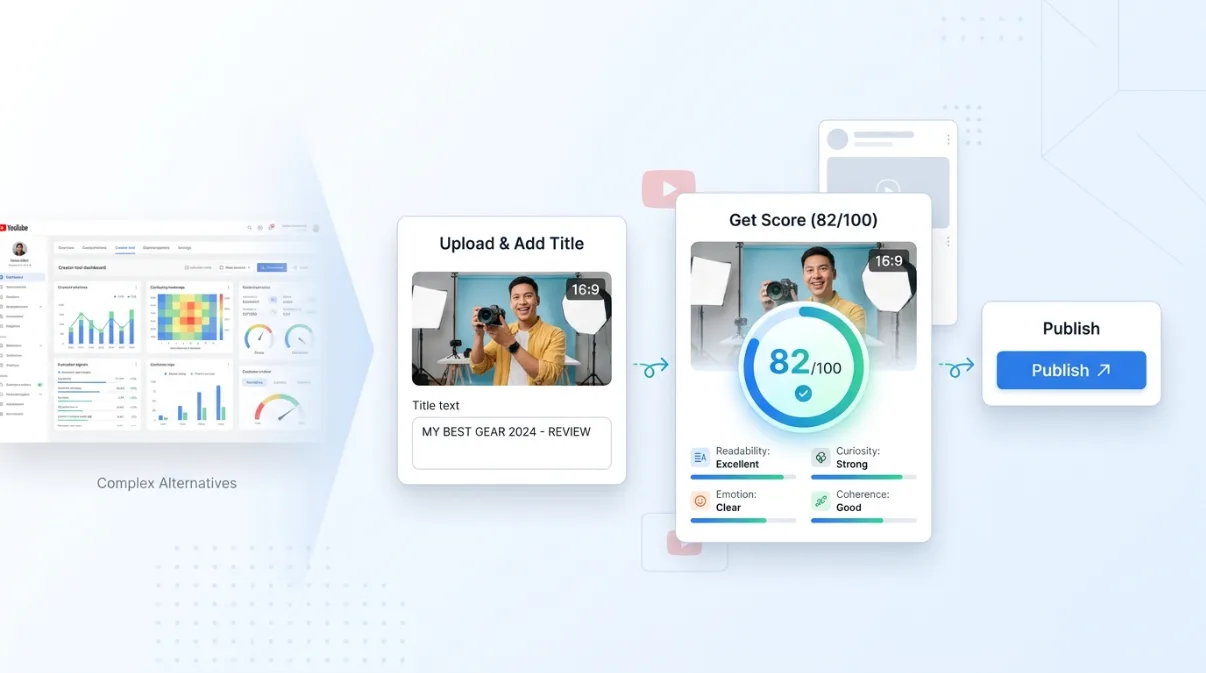
Key takeaways
- ThumbSignal is a TubeBuddy thumbnail analyzer alternative that works without a browser extension, using uploads or YouTube links.
- It evaluates thumbnails and titles together as one package, breaking down performance across 12 distinct visual and textual factors.
- Unlike TubeBuddy, it does not offer live A/B testing — it’s designed as a pre-publish diagnostic tool, not a replacement for full workflow suites.
- It’s ideal for creators who want focused, immediate feedback before publishing, without installing or managing browser tools.
What is a TubeBuddy thumbnail analyzer alternative?
ThumbSignal is a TubeBuddy thumbnail analyzer alternative that gives you detailed feedback in seconds on your thumbnail and title before you publish. Unlike TubeBuddy, it requires no browser extension — just upload your image or paste a YouTube link. It scores the thumbnail and title as a unified package, not in isolation, using a 12-factor breakdown that covers thumbnail readability, title strength, promise clarity, emotion and more. This makes it a focused diagnostic tool for pre-publish optimization, not a full workflow replacement.
How does ThumbSignal work without an extension?
ThumbSignal works entirely in your browser without requiring any extension. You simply upload your thumbnail image or paste a YouTube video URL, and the tool analyzes both the visual thumbnail and the accompanying title. No installation, no permissions, no background scripts — just a clean interface that delivers a 0-100 score and a detailed 12-factor breakdown. This makes it accessible from any device, even if you’re not on your primary machine or can’t install browser tools.
Why analyze thumbnail and title together?
ThumbSignal scores the thumbnail and title as one package because viewers see them together in the feed — they’re not separate decisions. A high-contrast thumbnail might fail if the title is vague or misleading, and a clever title might not convert if the thumbnail lacks emotional pull. The 12-factor breakdown evaluates both elements for readability, promise clarity, coherence, curiosity and emotion — giving you a view of the pair as a unit. This approach mirrors how viewers see the two, not how tools segment data.
What does TubeBuddy offer that ThumbSignal doesn’t?
TubeBuddy currently offers both thumbnail analysis and live A/B testing on real videos — a feature ThumbSignal does not provide. While ThumbSignal gives you a pre-publish diagnostic score, TubeBuddy lets you test two thumbnails against each other with real viewers to see which performs better in live conditions. This makes TubeBuddy better suited for channels running ongoing experiments or optimizing established content. ThumbSignal, by contrast, is designed to catch issues before they go live, not to measure performance after publishing.
When should you use ThumbSignal instead of TubeBuddy?
Use ThumbSignal when you need fast, focused feedback on a thumbnail and title before publishing — especially if you don’t want to install or manage a browser extension. It’s ideal for creators who publish regularly and want to avoid common pitfalls like low contrast, cluttered text, or mismatched emotional tone. It’s also useful for teams or freelancers who need to review multiple thumbnails quickly without setting up accounts or permissions. If you’re already using TubeBuddy for A/B testing or bulk management, ThumbSignal can complement it as a quick pre-publish check — not replace it.
How to get started with ThumbSignal in 5 steps
- Go to the ThumbSignal analyzer and choose “Upload” or “YouTube link.”
- Upload your thumbnail image, or paste the link of a video already on YouTube to load its thumbnail.
- Wait for the tool to analyze both the thumbnail and title — results appear in seconds.
- Review your 0-100 score and the 12-factor breakdown to identify weak points.
- Adjust your thumbnail or title based on the feedback, then re-upload to see improvements.
Comparison: ThumbSignal vs TubeBuddy thumbnail analysis
| Feature | ThumbSignal | TubeBuddy |
|---|---|---|
| Setup | No browser extension required — works from upload or link | Requires browser extension installation |
| What is scored | Thumbnail and title together as one package | Thumbnail alone (title analysis is separate) |
| Testing method | Pre-publish diagnostic — no live data | Live A/B testing on real videos |
Illustration: Improving a gaming thumbnail
Consider a gaming thumbnail showing a character mid-action on a bright background with small, white text. Its readability would be the obvious weak point: that factor reads text, contrast and clutter at feed size. Making the text bold and black with a white outline, and simplifying the background, addresses exactly that. This is an illustration rather than a scored case, but it shows the kind of fix the 12-factor breakdown points to.
Limitations to keep in mind
ThumbSignal is not designed to replace TubeBuddy’s full toolset — especially its live A/B testing, bulk management, or keyword research features. It also doesn’t track performance over time or integrate with YouTube Studio. Its value is in pre-publish diagnostics: catching visual or textual misalignments before they go live. If you’re running a channel that relies on iterative testing or managing multiple videos, you’ll still need a tool like TubeBuddy for those functions. ThumbSignal is best used as a quick, focused check — not a comprehensive workflow.
Try ThumbSignal for your next thumbnail
Whether you’re new to YouTube or a seasoned creator, getting feedback before you publish can save you from avoidable mistakes. ThumbSignal gives you a clear, actionable score and breakdown without requiring any setup. If you’re looking for a TubeBuddy thumbnail analyzer alternative that’s simpler and focused on pre-publish diagnostics, try the free thumbnail and title analyzer — upload your image or paste a link and get feedback in seconds on how to improve your click-through potential.
Related reading
Frequently Asked Questions
Is ThumbSignal a replacement for TubeBuddy?
No, ThumbSignal is not a replacement for TubeBuddy’s full toolset. It focuses on pre-publish thumbnail and title analysis without an extension, while TubeBuddy offers live A/B testing, bulk management, and keyword tools. They serve different purposes — ThumbSignal is a diagnostic, TubeBuddy is a workflow suite.
Does ThumbSignal require a browser extension?
No, ThumbSignal does not require any browser extension. You can use it by uploading a thumbnail image or pasting a YouTube video link — no installation, no permissions, no background scripts.
Can ThumbSignal analyze my title alone?
ThumbSignal analyzes the thumbnail and title together as one package. It does not offer standalone title analysis because the two elements are viewed together by viewers — their combined impact matters more than either alone.
Does ThumbSignal offer A/B testing?
No, ThumbSignal does not offer live A/B testing. It provides a pre-publish diagnostic score based on visual and textual factors, not real viewer data. If you need A/B testing, TubeBuddy or YouTube’s native experiment tools are better suited.
How accurate is the 12-factor breakdown?
The 12-factor breakdown is based on observable viewer behavior and platform best practices — contrast, emotional pull, text legibility, and visual hierarchy are consistently linked to higher click-through rates. While no tool can guarantee results, the factors reflect what tends to influence viewer decisions in the feed.