Key takeaways
- TestMyThumbnails previews how thumbnails appear in YouTube contexts and offers an AI ranking, but doesn’t explain why they succeed or fail.
- ThumbSignal diagnoses thumbnails and titles together using 12 specific factors that reveal what drives viewer attention and click-through behavior.
- The difference lies not in whether AI is used, but in how deeply the tool explains the relationship between visual design and title wording.
- Diagnosing the “why” behind performance helps creators make targeted improvements, not just test variations.
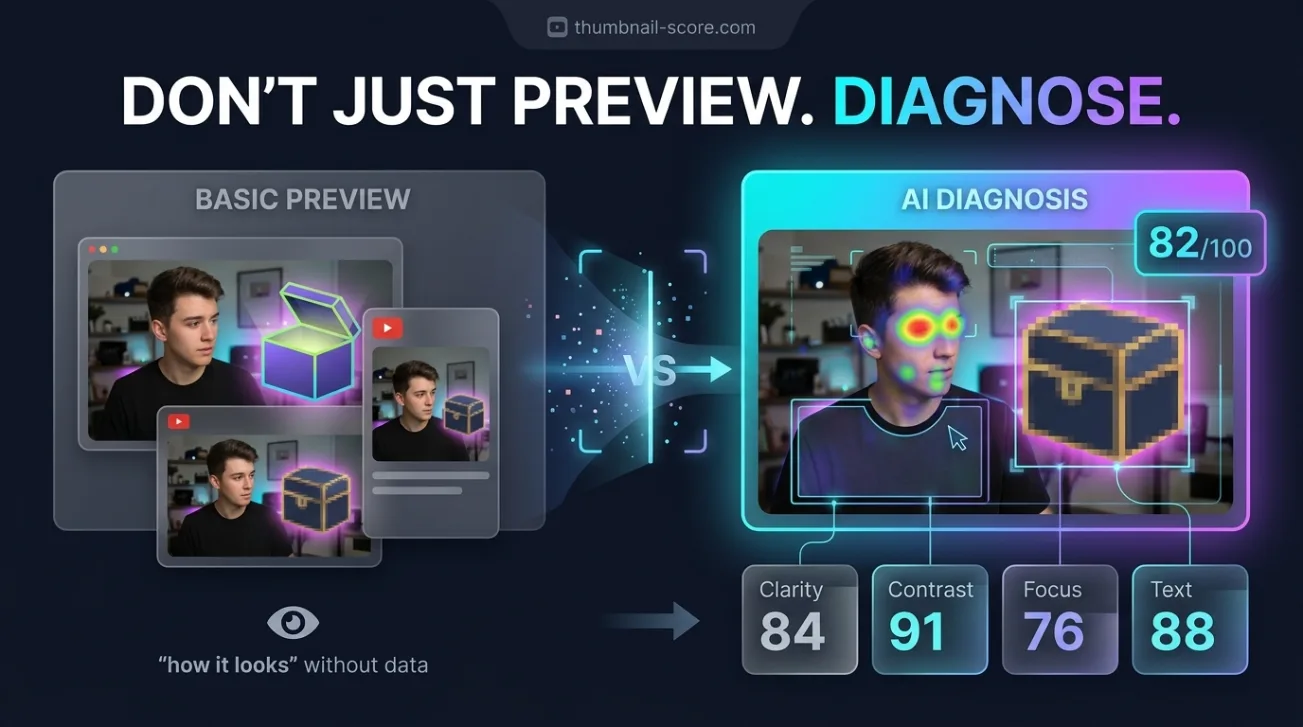
If you’re searching for a TestMyThumbnails alternative that diagnoses your thumbnail and title rather than just previewing how they look, ThumbSignal offers a deeper, factor-based analysis. While TestMyThumbnails helps you see how your thumbnail renders across YouTube’s interfaces — search, suggested videos, mobile — and includes an AI ranking, it doesn’t break down the underlying reasons for performance. ThumbSignal fills that gap by evaluating both your thumbnail and title together through 12 distinct scoring factors, revealing exactly what’s working — or not — and why.
What TestMyThumbnails Does — And What It Doesn’t Explain
TestMyThumbnails currently focuses on previewing how your thumbnail appears in real YouTube contexts — search results, suggested videos, and mobile interfaces — alongside an AI ranking feature. This helps creators visualize how their thumbnail renders across different placements, which is useful for spotting layout or scaling issues. However, it does not explain the psychological or compositional reasons behind why a thumbnail might attract or repel clicks. The AI ranking gives a score, but not the diagnostic breakdown that lets you improve systematically.
Why Diagnosing a Thumbnail Matters More Than Previewing It
Previewing a thumbnail tells you what it looks like; diagnosing it tells you why viewers might click — or ignore — it. A thumbnail that looks fine in a preview might still fail because it lacks emotional contrast, readable text, or a clear focal point. Diagnosing these elements lets you fix the root cause, not just the surface appearance. For example, a thumbnail with high contrast but no clear subject may score well visually but fail to communicate intent. Diagnosis reveals these mismatches between design and viewer psychology, which preview tools alone cannot address.
How ThumbSignal Diagnoses Thumbnails and Titles Together
ThumbSignal evaluates thumbnails and titles as a unified package, not as separate assets. Its 12-factor scoring system examines how both elements interact to drive viewer interest. Factors include visual contrast, text legibility, emotional hook, color harmony, subject clarity, title relevance, keyword placement, and more. Each factor is scored individually, so you know exactly which elements are strong and which need adjustment. This approach reveals whether your title is reinforcing your thumbnail — or undermining it — which is critical for maximizing click-through rate.
Example: A Gaming Channel’s Thumbnail and Title Diagnosis
Consider a gaming channel that uses a thumbnail with a character mid-action but a title that’s vague: “New Update!” The diagnostic might show high scores for visual energy and contrast, but low scores for title clarity and subject relevance. The tool would flag that the title doesn’t explain what the update is or why it matters, weakening the thumbnail’s impact. By adjusting the title to “New Update: 3 Game-Changing Weapons You Need Now,” the creator aligns the title with the thumbnail’s visual promise, improving both scores and likely CTR.
TestMyThumbnails vs. ThumbSignal: A Direct Comparison
| Feature | TestMyThumbnails | ThumbSignal |
|---|---|---|
| Primary Value | Contextual preview + AI ranking | Factor-level diagnosis + improvement guidance |
| Scope | Thumbnail only | Thumbnail + title together |
| Explanation Depth | Single AI score | 12 named, actionable factors |
How to Use Thumbnail and Title Diagnostics to Improve Your CTR
Diagnosing your thumbnail and title isn’t about chasing a perfect score — it’s about understanding which elements drive viewer behavior. A high score in one factor, like color contrast, doesn’t guarantee success if another, like subject clarity, is weak. Use the 12-factor breakdown to identify your weakest links and prioritize fixes. For example, if your text legibility score is low, simplify your font or increase contrast. If your emotional hook is weak, add a facial expression or action that conveys urgency or surprise.
- Upload your thumbnail and title into the diagnostic tool.
- Review the 12-factor scorecard to identify low-scoring areas.
- Focus on one or two factors to improve in your next revision.
- Test the revised version and compare scores to measure progress.
- Repeat the process to refine your thumbnail and title pairing over time.
When to Use a Diagnostic Tool Instead of a Preview Tool
Use a preview tool like TestMyThumbnails when you need to verify how your thumbnail renders across YouTube’s interfaces — for example, checking if text crops on mobile or if colors shift in dark mode. Use a diagnostic tool like ThumbSignal when you want to understand why your thumbnail isn’t getting clicks, even if it looks good in preview. If you’re stuck with low CTR despite visually appealing thumbnails, diagnosis reveals the hidden gaps between design and viewer intent that preview tools can’t expose.
Trade-Off: Depth vs. Speed
Diagnosis takes more time than previewing, but the payoff is targeted, sustainable improvement. A preview tool gives you a quick snapshot; a diagnostic tool gives you a roadmap. If you’re iterating rapidly, preview tools are faster. If you’re trying to break through a performance plateau, diagnosis is essential. Neither is “better” — they serve different stages of the optimization process.
Why the Thumbnail-Title Relationship Is Critical for CTR
Your thumbnail and title are not separate assets — they’re a single visual-textual package that viewers process in under a second. A strong thumbnail with a weak title can confuse viewers; a strong title with a weak thumbnail can fail to grab attention. ThumbSignal’s 12-factor system evaluates how these elements reinforce or contradict each other. For example, if your thumbnail shows a person smiling but your title says “I Quit Gaming,” the mismatch may confuse viewers and reduce CTR. Diagnosis reveals these inconsistencies so you can align both elements for maximum impact.
Get a Free Thumbnail and Title Diagnostic with ThumbSignal
Ready to move beyond previewing and start diagnosing your thumbnails and titles? Try ThumbSignal’s free thumbnail and title analysis tool to get a 12-factor breakdown of your current assets. See exactly which elements are driving — or blocking — clicks, and get actionable suggestions to improve your CTR. Whether you’re a new creator or a seasoned channel, understanding the “why” behind your performance is the fastest path to better results.
Related reading
- What Top YouTube Thumbnails Have in Common: 100 Real Examples
- How to A/B Test YouTube Thumbnails for Better Clicks
Frequently Asked Questions
Is ThumbSignal a direct replacement for TestMyThumbnails?
No — they serve different purposes. TestMyThumbnails previews how thumbnails render across YouTube interfaces; ThumbSignal diagnoses why they work or don’t. Use both tools at different stages: preview for layout checks, diagnose for performance improvement.
Does ThumbSignal offer AI scoring like TestMyThumbnails?
Yes, but it goes further. ThumbSignal uses AI to score 12 specific factors for both thumbnail and title, not just a single overall ranking. This gives you actionable insights, not just a number.
Can I use ThumbSignal to improve my existing thumbnails?
Absolutely. Upload any thumbnail and title pair to get a diagnostic scorecard. The tool highlights weak areas and suggests specific improvements, so you can refine existing assets without starting from scratch.
Do I need design skills to use ThumbSignal’s diagnostic?
No. The 12 factors are explained in plain language, and each comes with clear improvement suggestions. You don’t need to be a designer to understand what’s working — or not — in your thumbnail and title.
How often should I run a thumbnail and title diagnostic?
Run a diagnostic whenever you’re stuck with low CTR, launching a new series, or refining your channel’s visual identity. Regular diagnostics — every few weeks — help you spot trends and make incremental improvements that compound over time.